To do the lab test, you will work within three windows:
- A browser – to read these instructions.
- Eclipse – to answer the test questions.
- A terminal window – to submit your work.
This is a closed book test. You may only use the resources linked below.
Follow the instructions carefully!
RESOURCES
GETTING STARTED
- The lab test is contained in a Java archive file – a ZIP file. Click here to download
the archive file (click "save").
- Start Eclipse. In the Workspace Launcher, select the default workspace; i.e., "eclipse-workspace".
- Import the lab test as an Eclipse project.
(Click here to review the instructions for importing a Java
project archive file.)
- All the files needed for this lab test should now appear in Eclipse.
- Open a terminal. Use this terminal throughout the test to submit your work.
- Copy and paste the following commands into the terminal and press ENTER:
cdcd eclipse-workspace/ptest1A - Type the
lscommand to verify that you are in the correct directory. You should see the source (.java) files for the lab test. If you do not see the lab test files, use thecd,ls, andpwdcommands to navigate to the lab test workspace directory. Submit the source files NOW!To submit, copy and paste the following command into the terminal and press ENTER:
submit 1710 ptest1A Question*.javaYou should see something like the following if submission occurred successfully:
submitted:  Question1.java (61 bytes)
submitted:  Question2.java (61 bytes)
submitted:  Question3.java (61 bytes)
All files successfully submitted.
Alternatively, you can use web submit: https://webapp.eecs.yorku.ca/submit/.
- During the test, please keep the terminal open and use it to submit regularly. Do this by simply clicking in the open
terminal
window, pressing the up arrow key (↑) to find your previous submit command, and hitting ENTER to re-submit.
There will be a 5-minute warning near the end of the test. Please re-submit immediately when you get that warning!
The lab machine will shutdown at the end of the alotted test time.
ASIDE: To check the files submitted, copy and paste the following command into your terminal and hit ENTER:submit -l 1710 ptest1A - Proceed to do the following questions. Ensure your code follows the style conventions discussed in
lectures. Your code should be readable, use proper indentation, have no magic numbers, etc.
In Eclipse, use Source → Format or Ctrl+Shift+F to ensure your code is properly formatted.
Begin by opening the corresponding
QuestionX.javafile in Eclipse. Your first step is to replace the XXXs in the comment lines with your name and student number. Then, complete the programming task as per the instructions below. As you complete each question, submit your solution. Remember, repeated submits just overwrite previous submissions. Be sure to submit regularly! Good luck.
Question 1 (10 marks)
In Question01.java, write a simple program (main method) that converts an integer number of hours, minutes and seconds (stored as variables), into a total equivalent time (in minutes), and a total equivalent time (in seconds). Remember that there are 60 minutes in an hour, and 60 seconds in a minute.
Setup your own variables, assign them sample values and ensure that your code follows all appropriate STYLE conventions discussed in lectures (i.e. so that it is readable, has no magic numbers, compiles). YOU DO NOT NEED TO GET INPUT FROM THE USER!!
Format your output so that the total equivalent time in minutes displays as a result to 5 decimal places, while the total equivalent time in seconds displays as a result rounded to the nearest integer (formatted as follows):
Example 1: hours=7, minutes=6, seconds=13 should give the following output:
---------------
Time Converter:
---------------
7 hr, 6 min, 13 sec = 426.21667 minutes = 25573 seconds
Example 2: hours=1, minutes=28, seconds=14 should give the following output:
---------------
Time Converter:
---------------
1 hr, 28 min, 14 sec = 88.23333 minutes = 5294 seconds
Question 2 (10 marks)
In Question02.java, write a simple program (main method) that calculates and outputs the area of a triangle using Heron's formula. In this scenario, assume that:
- A, B and C are lengths of the sides of the triangle stored as integer variables (in metres "m").
- S is an intermediate variable (calculated according to the formula shown below)
- Area is calculated from Heron's formula (shown in red below)
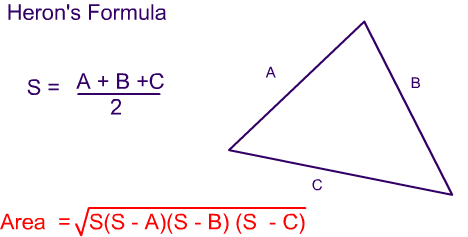
Setup your own variables, assign them sample values and ensure that your code follows all appropriate STYLE conventions discussed in lectures (i.e. so that it is readable, has no magic numbers, compiles). YOU DO NOT NEED TO GET INPUT FROM THE USER!!
Format your output so that the length of each side is displayed as an integer in metres ("m"), and the area is shown in both square metres ("sq. m") and square feet ("sq. ft"), to the nearest 2 decimal places.
Note: 1 square metre is equal to 10.7639 square feet.
Example 1: if we set A=7m, B=6m, C=8m the output should be:
=============
Heron's Area:
=============
The triangle (A=7m, B=6m, C=8m) has an area of 20.33 sq. m = 218.86 sq. ft
Example 2: if we set A=3m, B=6m, C=5m the output should now be:
=============
Heron's Area:
=============
The triangle (A=3m, B=6m, C=5m) has an area of 7.48 sq. m = 80.55 sq. ft
Question 3 (10 marks)
In Question03.java create and complete the method called isIsoceles(a,b,c) that accepts three integer arguments
that represent the lengths of the sides of a triangle (a, b and c). The method returns true if the triangle is isoceles
i.e. only 2 of the 3 sides are equal in length. The method returns false otherwise. The method also
returns false if any of the sides have zero length.
Examples of calling isIsoceles(a,b,c) with resulting output are shown below:
isIsoceles(1, 2, 3)returnsfalseisIsoceles(4, 4, 6)returnstrueisIsoceles(1, 5, 5)returnstrueisIsoceles(2, 2, 2)returnsfalseisIsoceles(0, 2, 2)returnsfalseisIsoceles(1, 0, 0)returnsfalse
isIsoceles(a,b,c) in the Question03.java fileThere are tests included which you can run from the main method to check your output.
SUBMISSION
To submit, copy and paste the following command into the terminal and press ENTER. If this does not work, you need to navigate to your project folder (using cd) before running the submit command.
again, upload all filessubmit 1710 ptest1A Question*.java
Question0*.java to web submit to ptest1A
through the following link